eSigner is offered as a paid add-on service and is available to all Document Signing and Code Signing customers. If you no longer require eSigner as part of your order, the subscription must be manually removed. Please follow the steps outlined in the sections below.
Do not revoke eSigner unless you already have your code signing certificate securely provisioned on a YubiKey hardware token or stored in your own Hardware Security Module (HSM).
If your certificate is issued exclusively within the eSigner cloud environment and you revoke eSigner, this action will revoke the entire certificate, not just the eSigner service. As a result, the certificate will become immediately unusable.
Recovering from this requires a full certificate reissuance, which can involve additional processing time.
Before proceeding with any revocation, confirm that you have an alternative, active key storage method in place to avoid unnecessary downtime and reissuance delays.
Select the Order You Want to be deactivated from eSigner
Login to your SSL.com customer account, Click the Orders tab on the Menu and choose the particular order that you want to be revoked of eSigner subscription. Next, click the download link for that order to show all the information for your certificate.
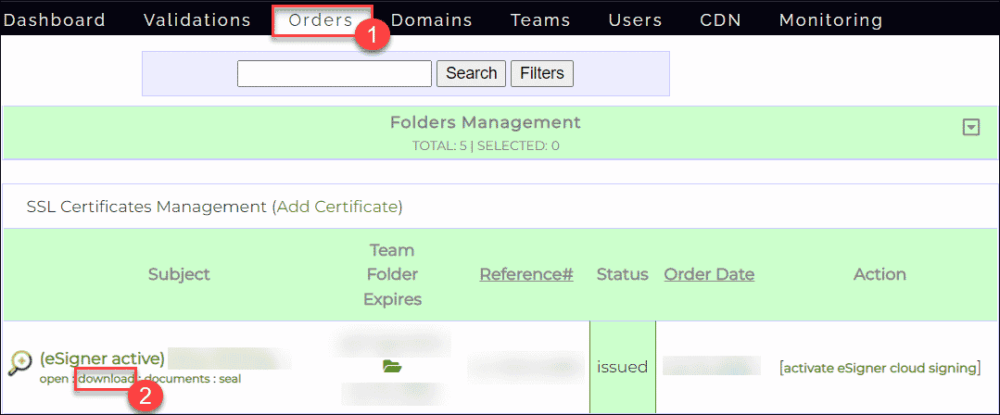
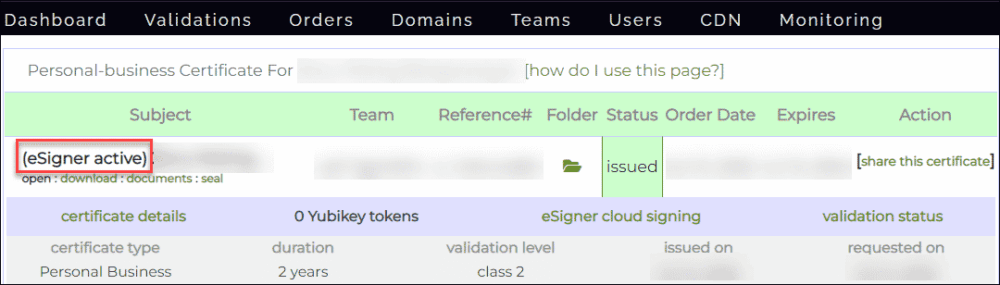
You will know that your order still has an active eSigner subscription if the words eSigner active can be found before the subject of the certificate.
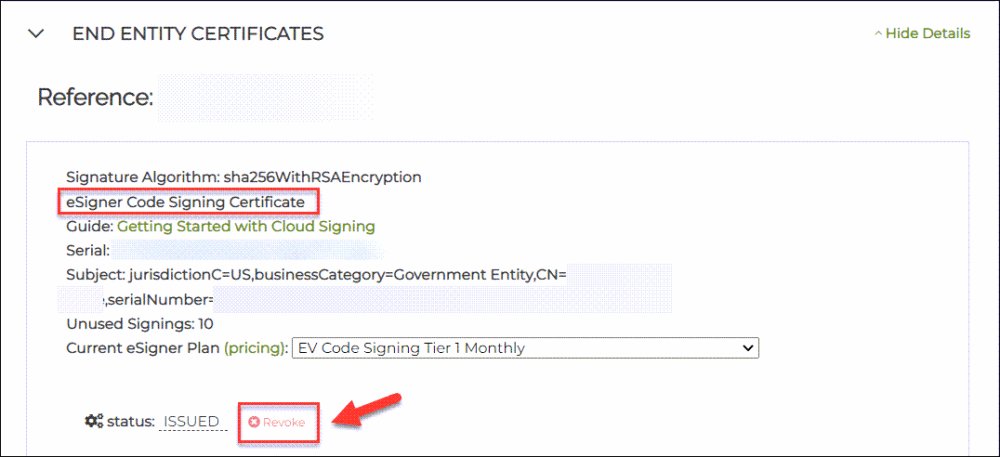
Click the REVOKE link
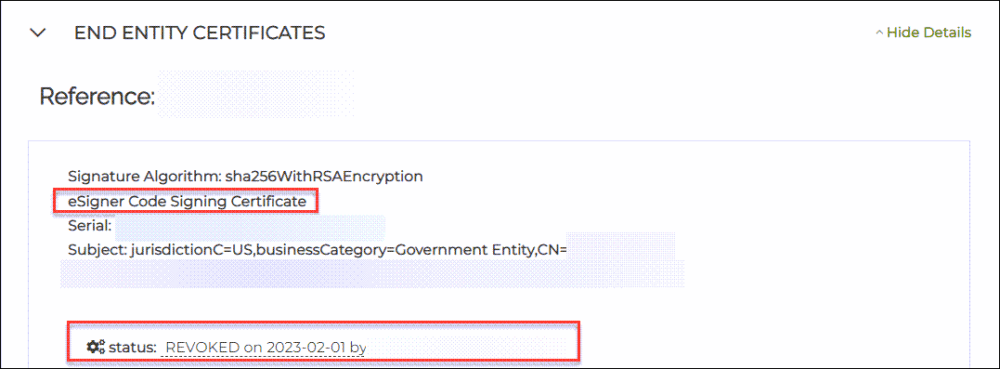
After clicking the download link, scroll down the page and locate the section that says END ENTITY CERTIFICATES. Look for the part that says eSigner Document Signing Certificate or eSigner Code Signing Certificate, depending on your order.
Here, you will find the REVOKE link with an X mark beside it. Proceed to click the link.
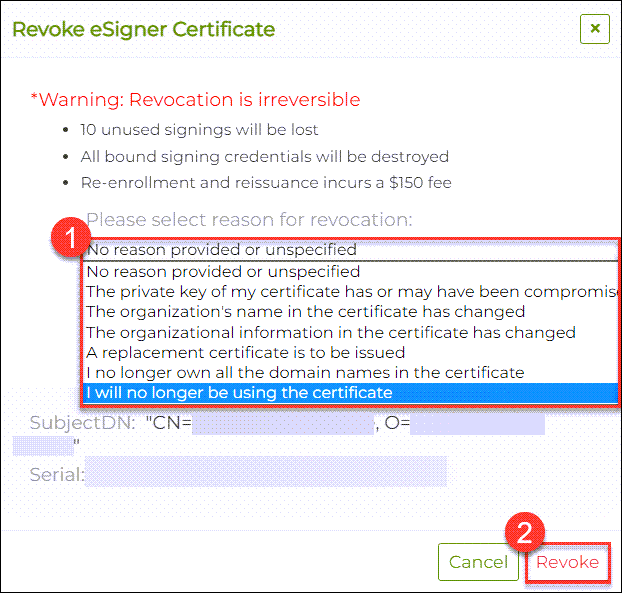
 If you have clicked the correct Revoke link for eSigner, you will then be prompted to select your reason for revoking eSigner. After confirming your reason, click the Revoke button. You have now successfully revoked eSigner.
Refresh the page and check for the revoked status
Scroll to the top of the page. Under the Subject column, there will no longer be the words “eSigner active” beside the subject of your certificate. This is now replaced with (eSigner available) to indicate that your certificate is not currently enrolled to eSigner and is available for resubscription.

If you scroll down the page again to the section saying eSigner Document Signing/Code Signing Certificate, you should see the status showing “REVOKED” and the date when you actioned it.
Remember, as long as you see eSigner available and not eSigner active beside the subject of your certificate, this means your eSigner subscription is deactivated.

We hope this guide has been able to help you. Get more information about the new eSigner Cloud Signing Platform by visiting https://www.ssl.com/esigner/.
If you have any questions about the eSigner Cloud Signing Platform, feel free to contact SSL.com by emailing support@ssl.com. You may also contact our friendly support staff via chat at the bottom-right corner of this page.Related Guides
eSigner Code and Document Signing Guides
Explore the following guides to better understand how eSigner cloud signing services support both code and document signing use cases and why it could be a good option for you. These resources explain available integration options, supported tools, and deployment models to help you select the most appropriate approach for your technical and operational requirements.- eSigner: Code Signing as a Service – Describes eSigner’s CSC-compliant cloud architecture for securely signing software without the need for physical tokens or or expensive networked HSMs.
- eSigner Document Signing Services – Details Direct API integration, DocSignTool (Java CLI), eSigner Cloud Key Adapter (CKA), Document Signing Gateway, eSigner.com, and Adobe Acrobat Sign integrations.
Testing eSigner in the Sandbox Environment
Before deploying eSigner in a production environment, customers are strongly encouraged to use the SSL.com sandbox. The sandbox provides a safe, non-production environment for validating integrations, testing signing workflows, and confirming application behavior without impacting live certificates or production systems.- Test API calls, tools, and integrations end to end
- Validate hashing, signing, and timestamping
- Identify configuration issues early and reduce deployment risk
eSigner Pricing and Production Readiness
If you are ready to use eSigner in production, review the available eSigner pricing plans to select the option that aligns with your signing volume, use case, and certificate type.- eSigner Pricing for Code Signing – Subscription options for cloud-based software and CI/CD code signing
- eSigner Pricing for Document Signing – Subscription options for cloud-based digital document signing