Effective March 1, 2026, new industry requirements from the CA/Browser Forum will limit the maximum validity period of publicly trusted code signing certificates to 458 days. In preparation, SSL.com began enforcing this 458-day cap on certificate issuance starting February 27, 2026. This change does not affect the total purchased term of a customer’s order, but individual certificates issued within that term may need to be reissued more frequently. Customers will still receive the full value of their purchase, even though each certificate will have a shorter lifespan. This update is mandatory across all publicly trusted certificate authorities and is designed to enhance security by reducing risk exposure and improving cryptographic agility.

With SSL.com’s eSigner service, you can use your SSL.com user credentials to sign code from any internet-connected device. This guide will show you how to enroll a OV, IV, or EV Code Signing certificate order in eSigner and sign code with the eSigner Express web app, or from the command line with CodeSignTool or SSL.com’s CSC-compliant code signing API.

eSigner can be used for Microsoft Authenticode and Java code signing, and can sign MSI installers and various types of scripts. A complete list of supported file types is available at the end of this guide.

To check all the file types that eSigner supports for enterprise code signing and document signing, head over to this article.

For instructions on how to automate EV Code Signing using signtool.exe or certutil.exe please review this how-to. eSigner also supports CI/CD integration for full automation of signings using CircleCI, Github Actions, Gitlab CI, Jenkins and Travis.

Before getting started, you’ll need an EV Code Signing certificate from SSL.com. For information on ordering your certificate from SSL.com, please read this how-to. If you’d like to try eSigner with a demo account and certificate, please read eSigner Demo Credentials and Certificates for credentials and configuration information.

Enroll in eSigner

First, you’ll need to enroll an OV, IV, or EV Code Signing certificate order with eSigner.

  1. Navigate to an issued Code Signing order in your SSL.com account. Note that the order is labeled eSigner Ready.
    eSigner-ready EV code signing order
  2. Click one of the download links.
    download links
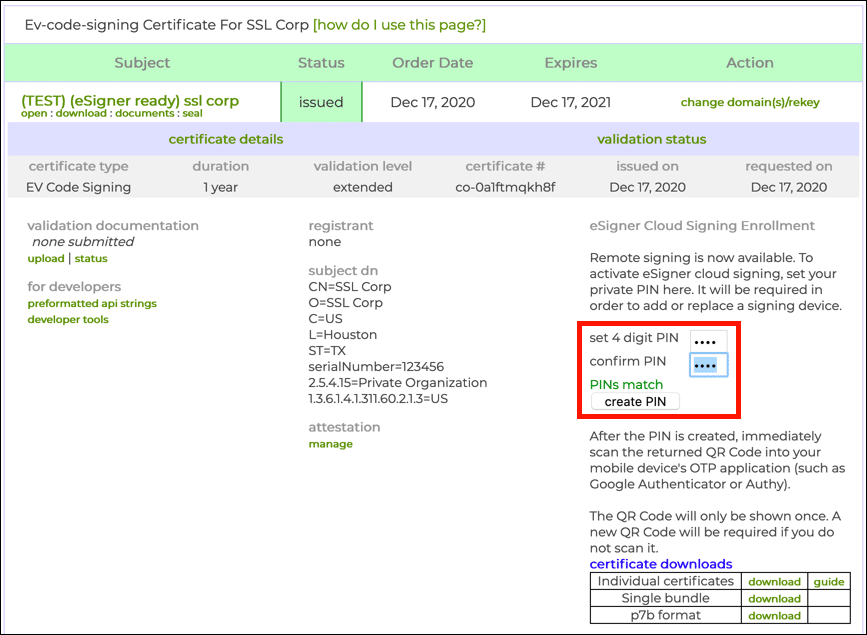
  3. Create and confirm a 4-digit PIN and click the create PIN button.

If you need to reset your eSigner PIN, please read this how-to.
Create PIN
  • Your certificate will be generated, and after a few moments a QR code will appear above the certificate downloads table.
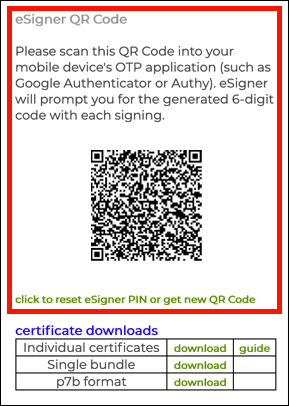
The next time you reload the page the QR code will not be visible. If you need to to view or reset your eSigner QR code, please read this how-to.
QR Code
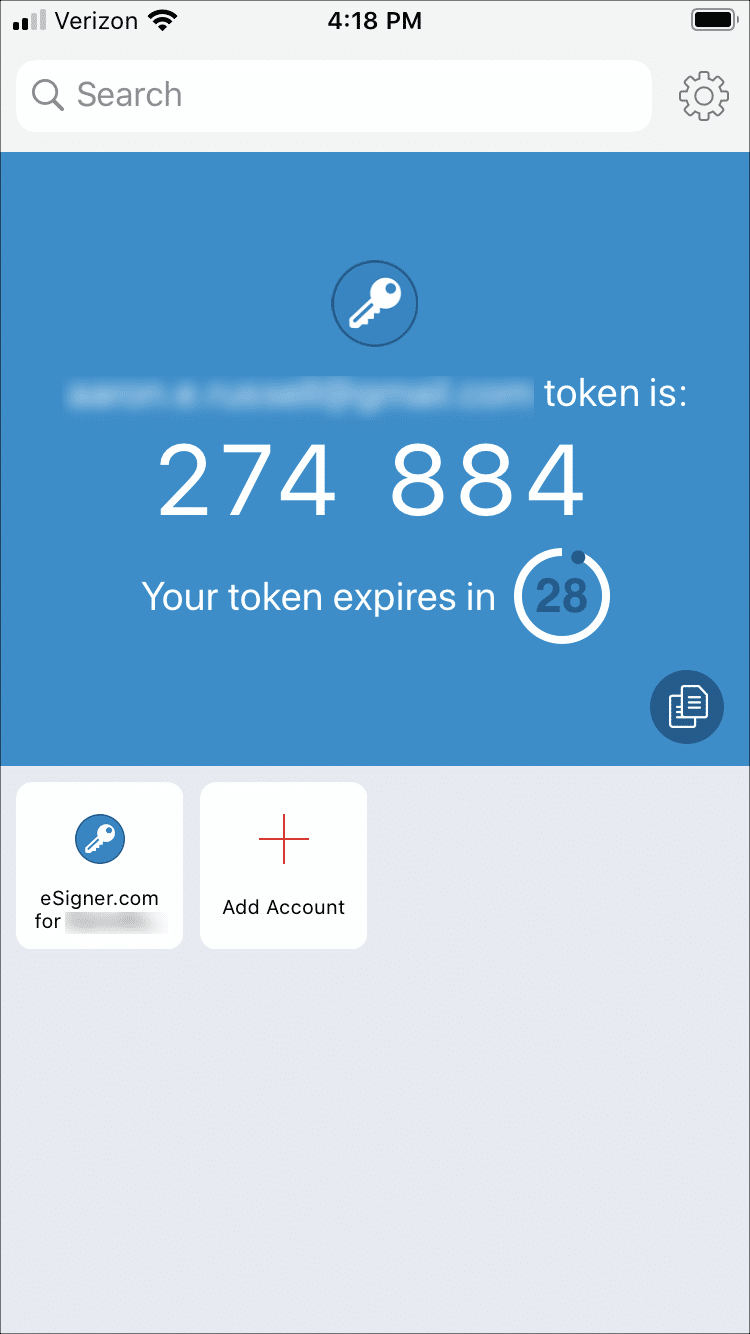
  • Scan the QR code into a 2-factor authentication app on your mobile device, such as Google Authenticator or Authy. The app will provide you with one-time passwords (OTPs) for use when signing. Each OTP is valid for 30 seconds.
    OTP in Authy
Tip: You can use eSigner to share EV code signing certificates between teammates. Please read Team Sharing for eSigner Document and EV Code Signing Certificates for instructions.

Supported File Types for eSigner Code Signing

Microsoft Authenticode File Types
  • acm
  • ax
  • bin
  • cab
  • cpl
  • dll
  • drv
  • efi
  • exe
  • mui
  • ocx
  • scr
  • sys
  • tsp
MSI File Types
  • msi
PowerShell Scripts File Types
  • ps1
  • ps1xml
Other Scripts File Types
  • js
  • vbs
  • wsf
Java File Types
  • jar
Don’t see a common file type that you’re trying to sign and should be supported? Please notify our team at Support@SSL.com.


Twitter
Facebook
LinkedIn
Reddit
Email

Stay Informed and Secure

SSL.com is a global leader in cybersecurity, PKI and digital certificates. Sign up to receive the latest industry news, tips, and product announcements from SSL.com.

Effective March 15, 2026, SSL/TLS certificate durations reduce to 200 days.

We’d love your feedback

Take our survey and let us know your thoughts on your recent purchase.

Privacy Overview

This website uses cookies so that we can provide you with the best user experience possible. Cookie information is stored in your browser and performs functions such as recognizing you when you return to our website and helping our team to understand which sections of the website you find most interesting and useful.

For more information read our Cookie and privacy statement.

3rd Party Cookies

This website uses Google Analytics & Statcounter to collect anonymous information such as the number of visitors to the site, and the most popular pages.

Keeping these cookies enabled helps us to improve our website.

Show details